
ERP for electrical contractors: Separate service visits from project work
Compare service and project requirements for an electrical contractor, including scheduling, material ownership, approved changes and billing evidence.
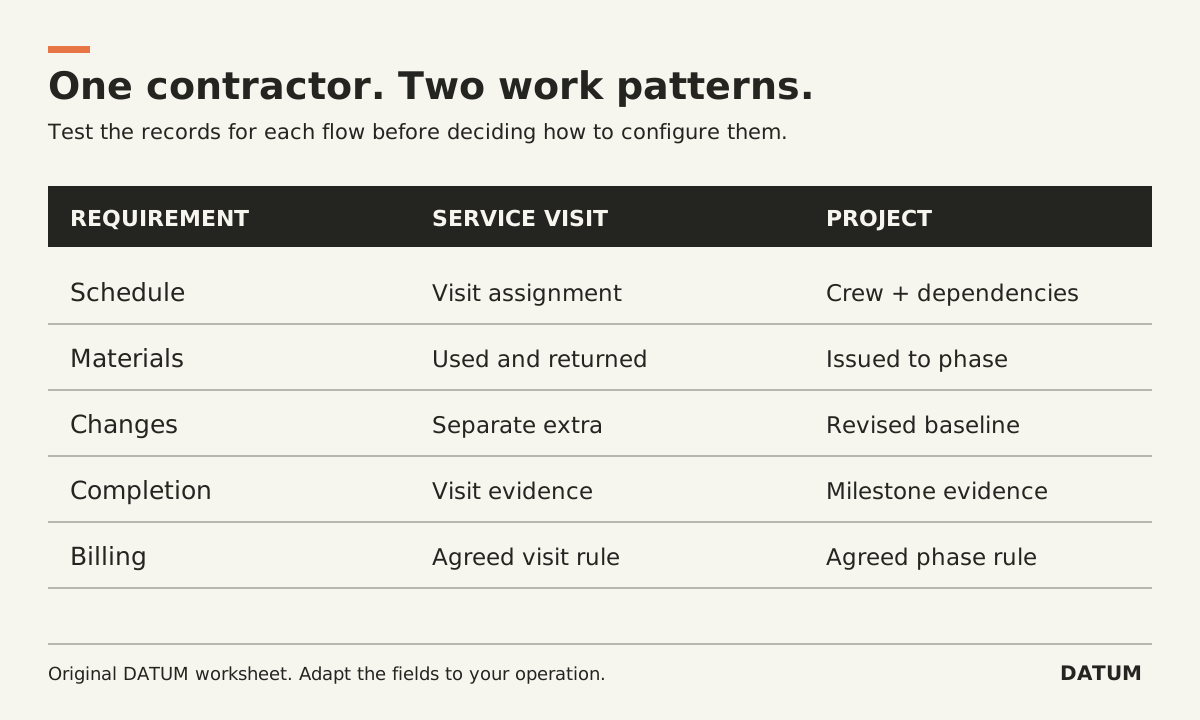
Separate a service visit from a project phase when evaluating ERP for an electrical contractor. They may share customers, people and materials, but their planning and closeout rules can differ. Test both flows and the handoff between them before selecting a configuration.
This worksheet concerns business records. Technical electrical work, safety procedures and regulatory decisions remain with the people qualified and responsible for them.
Put two representative jobs beside each other
Choose a permitted example of a discrete service visit and a project with several work periods. Record the trigger, responsible person, work instructions, material flow, completion evidence and billing rule for each.
An invented service example might begin with a customer request, proceed to an assigned visit, and end with reviewed completion evidence. An invented project might begin with approved scope, progress through phases and changes, and require a separate decision about each billing milestone. Neither pattern should be assumed for every contractor.
| Requirement | Service-visit question | Project-work question |
|---|---|---|
| Work authorization | What is approved for this visit? | Which scope and revision govern this phase? |
| Scheduling | Who attends, when, and with what instructions? | Which crew and dependencies determine the next work period? |
| Materials | What is taken, used or returned for the visit? | What is purchased, held or issued for the project or phase? |
| Changes | What extra needs separate authorization? | How does a change affect scope, schedule and cost baseline? |
| Completion | What lets the office close this visit? | What proves the phase or milestone is reached? |
| Billing | Which completed or authorized work is billable? | Which approved billing event applies? |
Use the table to identify genuine differences. Do not force separate applications merely because the worksheet has two columns. The same configured system may support both, but it must demonstrate the different rules.
Check the trigger that creates work
Odoo 19.0 documents several ways to create Field Service tasks, including manual creation and configured sales or Helpdesk flows. This makes task creation a useful demonstration point. It does not prove that every sold product should create a field visit or that one task represents an entire project. Odoo 19.0 Field Service task creation
Ask the provider to create a service request and a project award using your supplied rules. Inspect the resulting records. Who is responsible? Which scope is attached? What would prevent the same event from creating duplicate work?
For an Odoo Enterprise proposal, identify the applications, configuration and exact release. Use the cited 19.0 behavior as a reference, then test the proposed environment, including any Online SaaS differences.
Do not confuse task completion with a billing decision
Odoo 19.0's Project documentation describes milestones as important project steps and explains that they can also support milestone invoicing. The same documentation says linked tasks and manual milestone updates affect the reached state. That is a reason to test your precise completion and billing rules rather than assume a milestone label supplies the required approval. Odoo 19.0 project milestones
Have the project owner define the evidence required to mark a phase complete. Have the billing owner separately define the evidence needed to prepare a bill. Some businesses connect those decisions closely; others require further review. The software should preserve the agreed distinction.
Test the boundary between a visit and a project
Add an invented complication: a service visit identifies further work that the customer has not approved. Ask the demonstrator to record the finding without silently adding it to authorized scope. Then approve a separate project or extra through your normal process and follow the reference between the records.
Check material and labor attribution. A crew member working on two jobs in one day needs a usable way to assign work to the intended record. A return of unused material should not be lost because the service visit has already been closed.
These are proposed tests, not assertions about a named product. Save the demonstrated record references and list any additional configuration, integration or custom work required.
Let the next role judge the output
Ask dispatch to use the service record, the project lead to use the phase record and billing to prepare the appropriate draft. The ERP adoption scorecard can help judge whether each role completes a usable task rather than merely logs in.
Choose a configuration only after both flows are explainable. The requirement is that a visit, a project phase and an unapproved extra remain distinguishable to the people planning, performing and billing the work.