
How to tell whether people are using the ERP after go-live
Measure ERP adoption by completed work, usable handoffs and help needed. Use a role scorecard that separates training gaps from data and permission problems.
Measure ERP adoption by whether each role can complete its assigned work and hand over a usable record. A login count cannot answer that question. Neither can a training attendance list.
Pick a small set of routine tasks for each role. Observe a real permitted record or a realistic test record, record the help needed, and check whether the next person can continue. The scorecard below is a proposed management method, not an industry benchmark or a claim about your team's performance.
Give every role an observable finish line
“Uses purchasing” is too vague to assess. “Receives the correct item and quantity against the intended order, records the discrepancy, and leaves a record the buyer can resolve” gives an observer something to check.
Write one finish line for each recurring task. Include the record quality and the next person's need. A salesperson who creates a quotation but selects the wrong customer has used the system without completing the business task correctly.
For an Odoo 19.0 environment, run the observation with the person's intended permissions. Odoo documents permissions at user and group level that affect what users can access and edit. A task that succeeds under an administrator account may therefore tell you little about the intended role. Odoo 19.0 access rights
Use a scorecard that preserves the reason
Record one row per observed task, with the date and a record reference. Use a sample that includes ordinary work and the exceptions the role actually handles. Avoid selecting only the easiest completed records.
| Role and task | Usable finish | Observed result | Help or defect | Next action |
|---|---|---|---|---|
| Buyer: receive a partial order | Actual quantity recorded; remainder visible | Fill after observation | Training, data, configuration or policy | Owner and due date |
| Dispatcher: reassign a job | New owner and timing visible to the crew | Fill after observation | Same categories | Owner and due date |
| Technician: close a visit | Required evidence usable by billing | Fill after observation | Same categories | Owner and due date |
| Billing: prepare a draft | Lines trace to authorized work | Fill after observation | Same categories | Owner and due date |
| Supervisor: resolve an exception | Decision and follow-up recorded | Fill after observation | Same categories | Owner and due date |
Use four plain outcomes: completed independently, completed with help, blocked, or completed with an error. An error can also occur with help; preserve that detail in the notes rather than forcing a flattering single score.
A person should not receive a training assignment for an access restriction they cannot fix. A missing customer address may be a data problem. Conflicting rules about who can approve a credit are a policy problem. Classify the cause before choosing the remedy.
Check the handoff after the screen says complete
Ask the next person to use the record without a verbal explanation. Can billing identify what happened on site? Can purchasing identify what remains to be received? Can production find the approved revision?
Odoo's 19.0 Field Service documentation provides a useful warning about interpreting status labels: a saved worksheet can show as complete even if optional fields are empty. Required fields have a different completion rule. A status label alone is therefore insufficient evidence that your intended handoff information is present. Odoo 19.0 worksheets
This is not a reason to make every possible field mandatory. Decide what the next person needs for this task, then test those fields and their meaning. The field-service worksheet readiness guide gives a more detailed way to do that.
Show the denominator next to any percentage
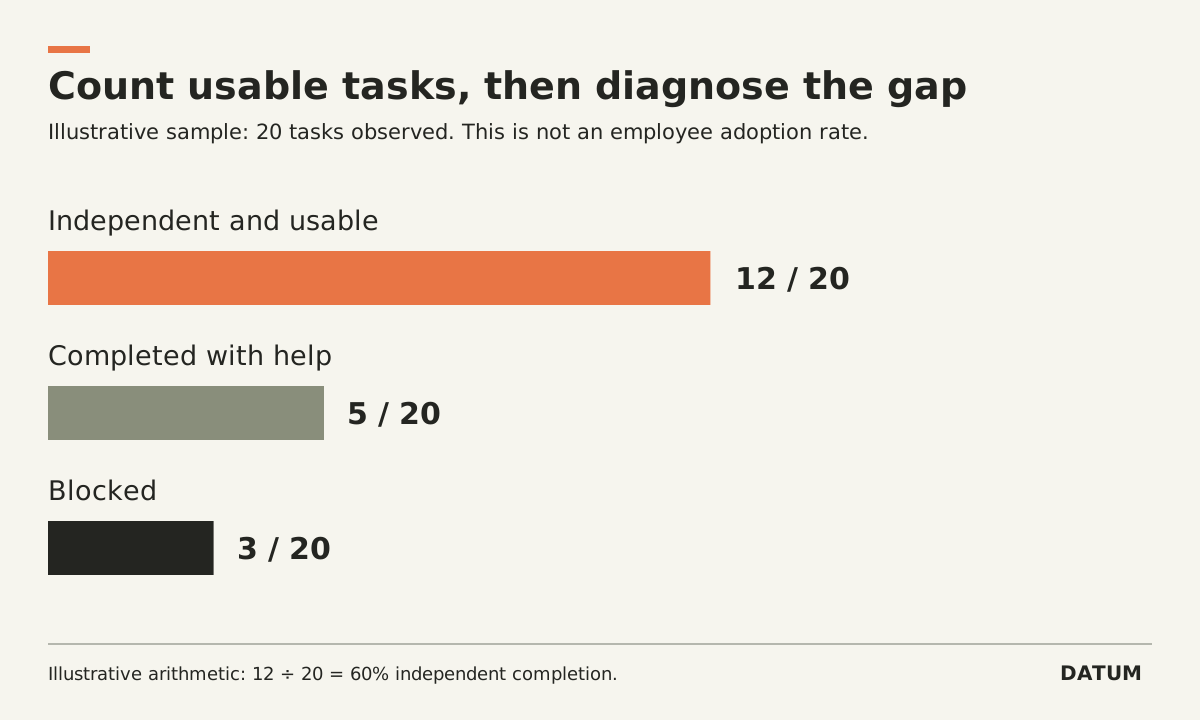
Suppose an invented weekly sample contains 20 observed tasks. Twelve finish independently with usable records, five finish with help, and three are blocked. The independent-completion rate is 12 ÷ 20 = 60%. It is not “60% of employees adopted the ERP,” and it is not a representative company-wide result unless the sampling method supports that conclusion.
Report the sample composition beside the calculation. If last week's sample was mostly routine receipts and this week's sample includes unusual returns, a lower rate may reflect harder work rather than declining adoption. Keep the outcome counts, role, task type and observation method available.
Avoid using the scorecard as a hidden employee ranking. Tell people which tasks are being observed and use the evidence to improve the process, training and configuration. Otherwise, the record may capture how well someone performs for an observer rather than how work normally moves.
Close the loop on one obstacle
At the review meeting, choose a repeated obstacle with a clear owner. Correct it, repeat the affected task under the same role, and ask the next person to use the output again. Keep both observations.
The decision you need is practical: which role can now work independently, which task still needs help, and what prevents the handoff from being usable. That is enough to assign the next fix without turning adoption into a contest over login counts.