
Roofing CRM: Check the handoff from sold job to production
Evaluate a roofing CRM by tracing approved scope into production and the final bill. Use a handoff checklist for measurements, extras and completion evidence.
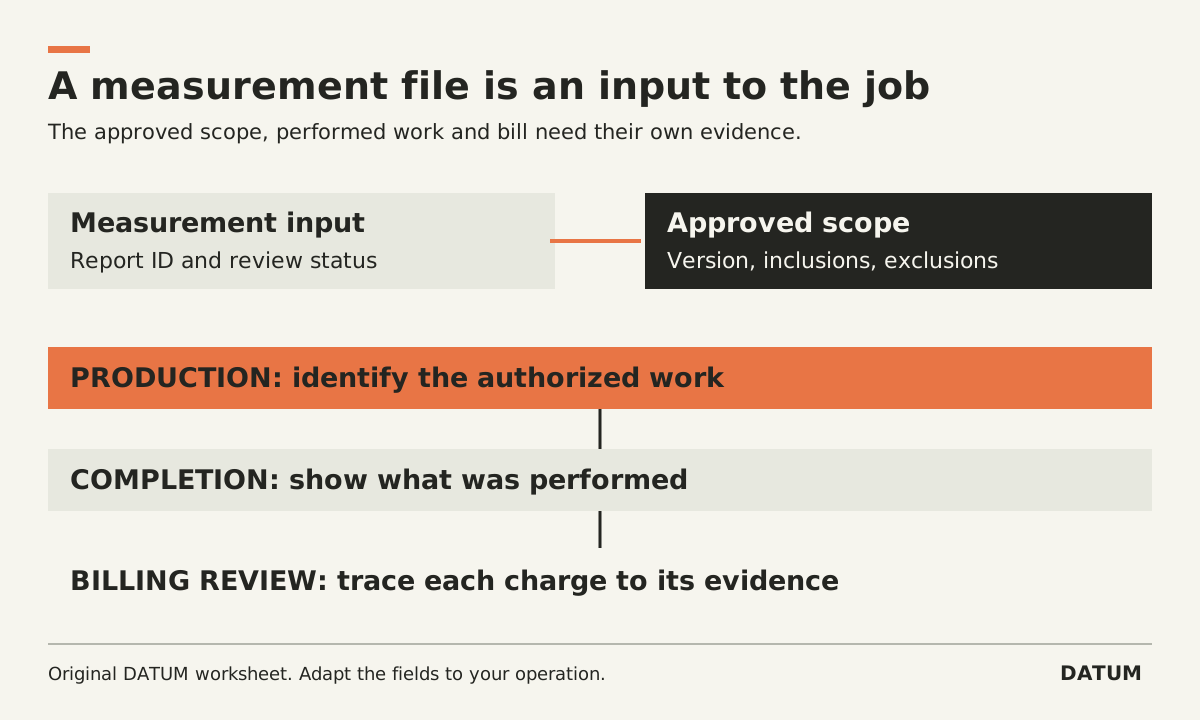
A roofing CRM should let production identify exactly what was sold and let billing explain what was completed and authorized. Test that chain with one job, including a scope change. A won deal and a scheduled installation are different records with different responsibilities.
Begin with your approved customer scope, not a software feature list. The checklist below evaluates the handoff; it does not supply roofing specifications, contract terms or installation advice.
Keep measurements separate from the approved scope
A measurement report can help prepare an estimate, but it does not by itself record the customer's chosen products, exclusions, change approvals or every condition discovered on site. Keep the report connected to the job while identifying the separate document that defines the authorized work.
For example, GAF describes QuickMeasure reports and measurement exports in formats including PDF, XML and DXF. Those are useful inputs to inspect in a workflow demonstration. File availability does not establish that a particular CRM imports the data correctly or converts it into approved scope. GAF QuickMeasure
Ask the estimator to point to the report used and the scope version approved. Then ask production to open those records without using the estimator's private messages. If the connection depends on a remembered filename, make that a requirement for the software evaluation.
Build a production-ready handoff record
Copy this sheet for one permitted job. “Ready” should be a decision by the responsible person, supported by the necessary information, rather than an automatic consequence of moving the deal to won.
| Handoff element | Evidence the receiving person needs | Record owner |
|---|---|---|
| Customer and site | Correct contact, service address and job ID | Sales or office |
| Approved scope | Identifiable version, inclusions and exclusions | Sales |
| Measurement input | Report reference and review status | Estimator |
| Material choices | Approved product, color and quantity basis | Estimator and production |
| Production instructions | Work-specific instructions and dependencies | Production lead |
| Open conditions | Unresolved items, decision owner and timing | Assigned owner |
| Authorized extras | Separate scope and approval evidence | Office or sales |
| Completion evidence | Required records for the office to review | Crew and production |
| Billing basis | Authorized charges and completion references | Billing |
Some organizations need additional records. Add them because a person uses them to make a decision, not because the CRM permits another custom field. Avoid storing sensitive customer details in a broad job note when a narrower approved record is sufficient.
Run one change through the demonstration
Use an invented scenario or sanitized historical job. The initial scope is approved and scheduled. Before the job is completed, an additional item is identified. The crew reports it; a responsible person determines scope and price; authorization is recorded before the extra proceeds under your business rules.
Ask the demonstrator to show the proposed extra before approval. Can production distinguish it from authorized work? Then show the approved extra, the crew's instructions and its completion evidence. Finally, prepare the invoice for review.
This is a test script, not a claim that a named product supplies each control. A note saying “customer said yes” may be insufficient for your agreed process. Define the evidence you require before asking the vendor to configure it.
Introduce one revision to the extra before approval. The purpose is to see whether the person performing the work can identify the current authorized version and whether billing can identify what was actually completed. Do not allow the presenter to skip to the final invoice and declare the chain proven.
Inspect completion evidence before billing
Have the billing person work from the records left by the crew. If they must call someone to interpret a missing quantity or unexplained line, record the missing handoff requirement.
This is relevant when evaluating Odoo as part of the workflow too. Its 19.0 Field Service worksheet documentation distinguishes required fields from optional fields and notes that saving a worksheet can show it as complete while optional fields remain blank. Therefore, test the specific evidence your office needs rather than relying on the completion label. Odoo 19.0 worksheets
That reference is for the documented 19.0 behavior, not an assertion that Odoo is a dedicated roofing CRM or that a different SaaS version and configuration will match it. The worksheet readiness guide helps translate the handoff requirements into a test.
Accept the connection only after another person can use it
For each handoff, save the source record, receiving record and unresolved exception. Have sales, production and billing each explain their own next action. A shared dashboard is helpful only if the underlying records support those actions.
If the job cannot be followed through your current process, trace it before replacing the software. The resulting checklist becomes a practical CRM requirement: preserve the agreed scope, make changes identifiable, and leave enough completion evidence for the office to finish its work.