
Job costs in QuickBooks Online: Reconcile the job before judging its margin
Use a job-cost worksheet to check project identity, assigned costs and missing records in QuickBooks Online before interpreting the reported margin.
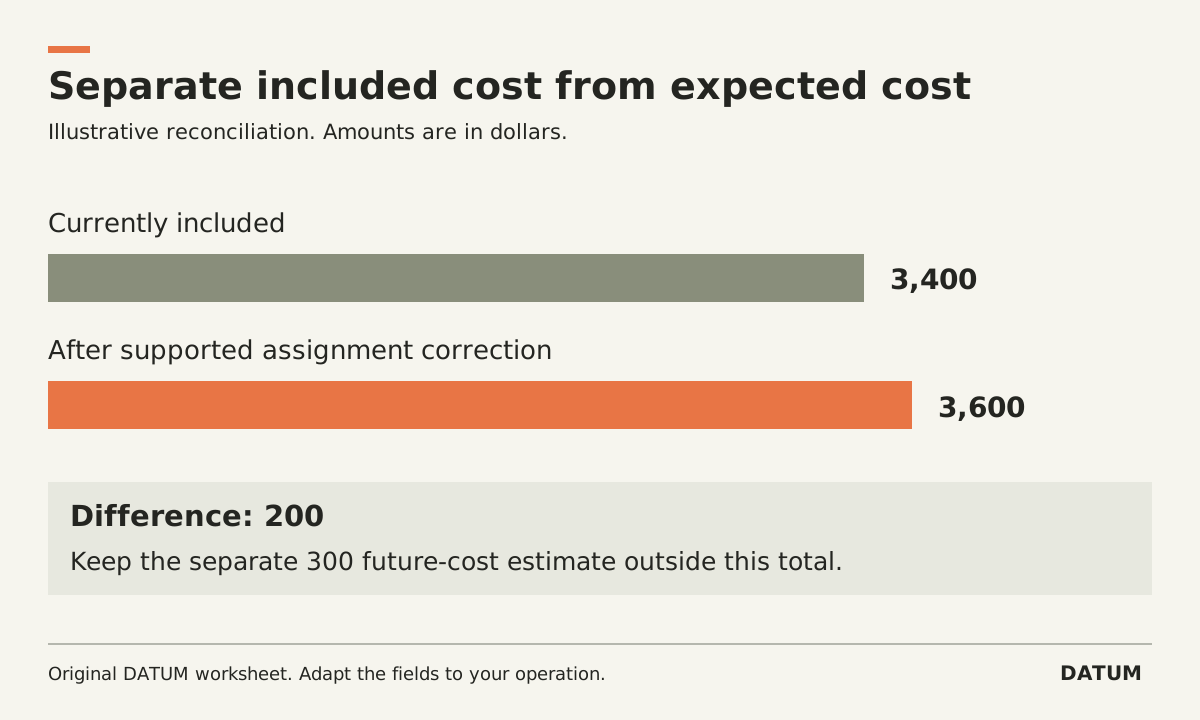
Before using a QuickBooks project margin to judge a job, reconcile the records included in that project. Confirm the job identity, the period being reviewed and which income and costs have actually been assigned. A tidy dashboard can still represent an incomplete job.
Intuit's US documentation describes Projects in QuickBooks Online Plus and Advanced as a way to track project income and costs. It explains assigning transactions to the project and identifies some additional estimate-versus-actual functionality in Advanced. Confirm your plan and region before designing the workflow. Intuit's Projects guide
The worksheet below is an operational reconciliation method. Your accountant should determine the accounting treatment and reporting basis; the task here is to make record coverage visible.
Decide what one job means
Write a stable job identifier and its customer relationship. Decide whether a separate phase, return visit or approved extra remains in the same job or becomes another project. Apply the rule consistently enough that two people do not assign the same work differently.
Include the operating job ID in the cross-reference if dispatch uses another system. A customer can have more than one job, and a familiar customer name is not a sufficient match. Keep a small mapping list with the operating job ID, QuickBooks project reference and owner of corrections.
Before reviewing the numbers, record the cutoff date. “Job complete in the field” may occur before the last supplier bill or approved time record has arrived. Make that timing difference visible rather than silently treating the current report as final.
Reconcile each cost category to evidence
Start with the categories the business uses to manage the work. Materials, labor and outside services may be useful operating categories, but the accounting setup must fit your actual records. Do not create a new chart of accounts merely to copy this table.
| Cost category | Evidence expected | What is assigned to the project? | What still needs resolution? |
|---|---|---|---|
| Materials | Relevant supplier and usage records | Transaction references and included amount | Missing job reference, return or allocation question |
| Labor | Approved time and selected cost basis | Included hours and cost source | Unapproved time or inconsistent rate basis |
| Outside services | Approved work and supplier record | Included transaction references | Late bill or wrong job assignment |
| Other defined job costs | Evidence specified by the business | Included records | Unclear classification or unsupported allocation |
Keep “not yet recorded,” “recorded but not assigned” and “assigned to another job” as separate exception types. They require different actions and should not be fixed by inserting an unexplained balancing amount.
For labor, write down which cost basis the report uses and compare like with like. Avoid adding a second calculated labor amount on top of costs already included through another source. Ask the accounting owner to resolve an uncertain overlap before treating it as extra cost.
Use an evidence bridge for the difference
Here is a simplified invented reconciliation, in dollars. It is not a set of entries to post.
The project report includes $2,000 of materials, $900 of labor and $500 of outside services: $2,000 + $900 + $500 = $3,400.
The review identifies a supported $200 material cost that exists in the records but is not assigned to this job. The report-to-evidence difference is $200. If the accounting owner confirms the assignment, the corrected included cost would be $3,400 + $200 = $3,600.
A separate supplier estimate for $300 of unfinished work remains an expected cost, not an incurred cost established by this example. Keep that forecast in a separate column. Combining incurred and expected costs without labeling them makes the report harder to interpret.
| Review view | Illustrative amount | Meaning |
|---|---|---|
| Cost currently included | $3,400 | Existing project report |
| Supported assignment difference | $200 | Requires the approved correction |
| Cost after that correction | $3,600 | Reconciled included cost in this example |
| Separate expected future cost | $300 | Forecast, not part of the $3,600 |
Leave a closeout record another person can use
For each open exception, name its evidence, owner and next action. After an approved correction, rerun the relevant report and save the comparison using the same period and reporting basis. Do not compare one report including a later bill with an earlier cutoff and call the change a performance improvement.
Have the person responsible for billing and the person responsible for costs confirm what remains outstanding. If the operating records cannot be followed into the project, trace one job across the handoffs. The useful outcome is a project report whose contents can be explained, including what it still excludes.