
Agree product codes and units before an Odoo import
Review product identity, supplier references and units before import. Reconcile a purchase-to-issue example and preserve stable product identifiers.
Before importing products into Odoo, agree which record identifies the item and how each quantity is measured. A product name alone is rarely enough to explain whether two rows represent the same item, different variants, different packaging or an obsolete code.
Build a product identity sheet that purchasing, inventory and operations can review together. Keep the supplier's description and code as references rather than assuming they should become the business's own product identity.
Odoo 19 supports different configured units for purchasing and inventory and describes conversion between them. The documentation also distinguishes inventory units from sales packaging. These settings deserve a test with actual quantities before a bulk import. Odoo 19 units of measure.
Resolve identity before formatting the file
Consider a fictional buyer who orders “seal kit, box” while the warehouse issues individual kits. One supplier's box contains six kits; another supplier sells a differently packaged product with a similar description. Copying both descriptions into one product name could hide a meaningful difference.
First decide whether the underlying kit is the same approved item. If it is, record the supplier-specific ordering information and its verified conversion. If it is not, keep separate identities. If interchangeability is unknown, assign that question to the person responsible for the product specification.
Use the same discipline as the customer identity review: similarity creates a candidate for investigation, not automatic permission to combine records.
Use a product definition sheet
| Field | Decision required before import |
|---|---|
| Internal identity | Stable code and intended destination identifier |
| Working description | Words operators use to distinguish the item |
| Variant or revision | Which differences require separate identification |
| Inventory unit | Unit used to count and move the item |
| Purchase unit | Unit the supplier actually quotes and delivers |
| Conversion | Verified relationship, source and any rounding rule |
| Supplier reference | Supplier-specific code and description |
| Status | Current, superseded or held for review |
| Owner | Person authorized to resolve identity and unit questions |
Do not use one generic “box” conversion for every product unless that is actually the approved definition. A packaging label is not evidence of the contained quantity. Keep the supplier specification or another reliable source with the decision.
Reconcile an example by hand
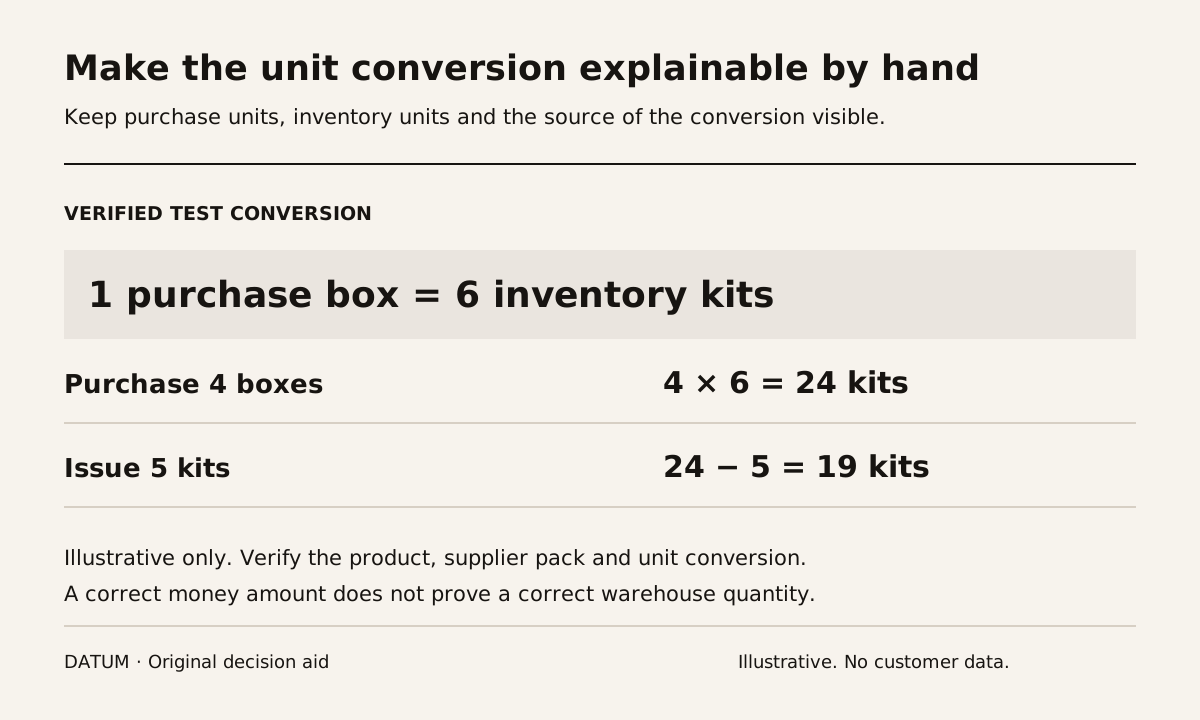
For a fictional test, suppose one verified purchase box contains six kits. An order for four boxes represents 4 × 6 = 24 kits. If five kits are then issued and no other movement occurs, the expected remaining quantity is 24 − 5 = 19 kits.
Those numbers are a chosen test, not a product recommendation. Run the same purchase, receipt and issue in the rehearsal database. Inspect the unit shown on each document and the resulting on-hand quantity. A matching purchase amount does not prove that the warehouse quantity is correct.
Add a partial receipt to expose the practical conversion. If two of the four boxes arrive, can the receiver record the intended quantity and show what remains open without guessing whether the field means boxes or kits? Preserve the resulting documents as evidence.
Keep technical identifiers stable
Odoo's import documentation explains how External IDs support updating existing records and connecting related data. Choose and preserve the mapping rather than regenerating identifiers whenever the display name changes. Odoo 19 export and import data.
Import a small sample containing a normal item, a variant, a supplier reference and a held ambiguity that is deliberately excluded. Then apply a permitted update and confirm that it changes the intended record instead of creating another product. Use the migration rehearsal controls to reconcile record counts and rejected rows.
Also inspect the references from a bill of materials or open order in the test. A clean product list is not sufficient if the related documents point to a superseded identity or use the wrong unit.
Give ambiguous rows a visible disposition
Hold unresolved combinations with a reason and owner. Examples include an unknown pack quantity, two codes that may be substitutes or a product whose revision cannot be established. Decide how that hold affects open purchasing and production work before the release date.
Avoid changing units on established live records as a casual cleanup step. Plan and test the correction with the people responsible for quantities, history and valuation. This guide defines import readiness, not an instruction to rewrite existing stock history.
The accepted output is a product set whose identities and quantity conversions the operating team can explain. Once that agreement exists, the import file becomes a representation of decisions already made rather than the place where those decisions are accidentally invented.