
Rehearse an ERP migration with counts, relationships and recovery
Check whether an ERP migration moved the right records and preserved their meaning. Use a count bridge, relationship tests and a written failure decision.
Rehearse an ERP migration by proving three things: the intended records arrived, their values and relationships are correct, and the team knows what to do if validation fails. A successful import message proves less than that.
In Odoo 19, the import documentation warns that imports are permanent and cannot be undone through a simple reversal. It also describes External IDs as a way to identify records across imports, and warns that changing or removing those identifiers can create duplicates during updates. Treat identifier design and recovery planning as prerequisites. Odoo 19 import documentation.
This guide proposes operational checks. It does not prescribe accounting balances, retention rules or a production restore command. Your finance owner and technical owner must decide those details for the actual environment.
Freeze the sample and record what it contains
Start with a copy of the source extract that will be used for the rehearsal. Record the extraction time, selection rule, source system, file version and person responsible. Preserve that copy so a later comparison does not silently use a different population.
Choose a sample that covers important relationships and exceptions. A customer with one address does not test separate billing and service addresses. One stock item does not test lots, units or missing references. Include problematic records on purpose, and label what you expect to happen to them.
Define the destination of every source record: migrate, merge under a documented rule, retain in an approved archive, or hold for correction. “We did not import it” is not an explanation of where the business can find it later.
Reconcile populations before checking individual screens
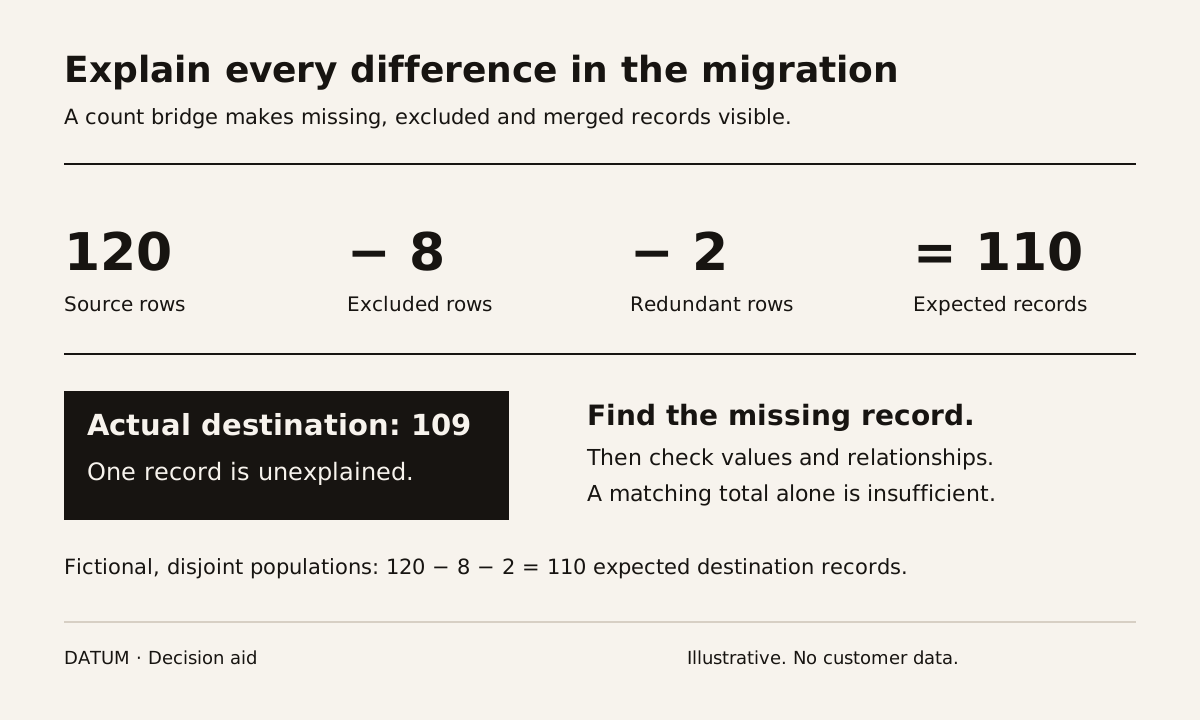
Use a count bridge to explain why the destination count should differ from the source count. Here is a fictional customer example:
| Reconciliation step | Records | Explanation |
|---|---|---|
| Source extract | 120 | Frozen rehearsal population |
| Excluded from this migration | 8 | Documented archive decision |
| Duplicate rows consolidated | 2 | Two redundant rows merged into retained records |
| Expected destination records | 110 | 120 minus 8 minus 2 |
| Actual destination records | 109 | One record remains unexplained |
The correct next action is to find the missing record. Do not accept the result because the difference appears small. It could be the one customer with an open order.
This arithmetic only works when the exclusions and duplicate-row reductions are disjoint and documented. Track source-to-destination identifiers so reviewers can identify exactly what was excluded or consolidated.
Counts need values, relationships and a business test
A matching count is necessary for this example, but it is insufficient. The same number of records can contain incorrect addresses, wrong units or broken links.
Build the validation sheet around the record type:
| Record type | Control check | Relationship check | Business action to test |
|---|---|---|---|
| Customer | Expected count and required fields | Billing and service addresses belong to the correct customer | Prepare an order using the intended address |
| Product | Count, identifiers and units | Product points to the correct category and permitted references | Select it in an agreed purchasing or sales scenario |
| Inventory | Quantity by product, location and relevant tracking identifier | Stock belongs to the intended location and lot/serial record | Trace a sample movement without losing identification |
| Open order | Count, status and agreed line totals | Customer, product and source reference remain connected | Continue the order through the agreed next step |
Financial records require the finance owner's reconciliation rules. Do not combine unlike currencies, units or accounting categories into one total merely because a spreadsheet can sum them.
Consider another fictional check: the source contains 45 units across two lots. The destination also contains 45 units, but the lot identifiers have been exchanged. The overall total passes while traceability fails. A grouped total and a record-level sample catch different errors.
Test a repeat import deliberately
In a disposable rehearsal environment, run the planned update path with the same stable identifiers. Check whether it updates the intended records, leaves unrelated fields alone and produces no unexpected duplicates. Then test a known rejection, such as a required relationship that does not exist.
Record the file version, mapping, import result, affected IDs and reconciliation result for each run. If someone changes the mapping between attempts, rerun the affected validation cases. A screenshot of a successful earlier run does not validate the changed mapping.
Odoo Online supports duplicated databases with a testing option that disables external actions; Odoo.sh has neutralized staging databases. Confirm the actual environment is isolated and inspect external connections before using customer-like records. Test settings do not authorize exposure of real customer data. Odoo Online testing duplicates, Odoo.sh staging.
Write the failure decision before the live import
Name the person who decides whether to continue, correct the data or use the recovery plan. Define release-blocking conditions, such as unexplained control differences, missing critical relationships or an untested restore path.
A database backup alone is not a complete business rollback. If users have entered new work or external systems have received transactions since the backup, restoring it could remove valid work or leave the systems inconsistent. The recovery plan must account for that interval and for actions outside the database.
End the rehearsal with an evidence packet: source manifest, mapping, exclusions, run log, reconciliations, business-test results and unresolved items with owners. The production decision should refer to that packet. Start by tracing the records behind one job with the handoff worksheet, then decide which populations the migration actually needs.