
Resolve duplicate customer identities before an Odoo import
Review customer identities, locations and contacts before an Odoo import. Preserve source mappings, resolve field conflicts and test related records.
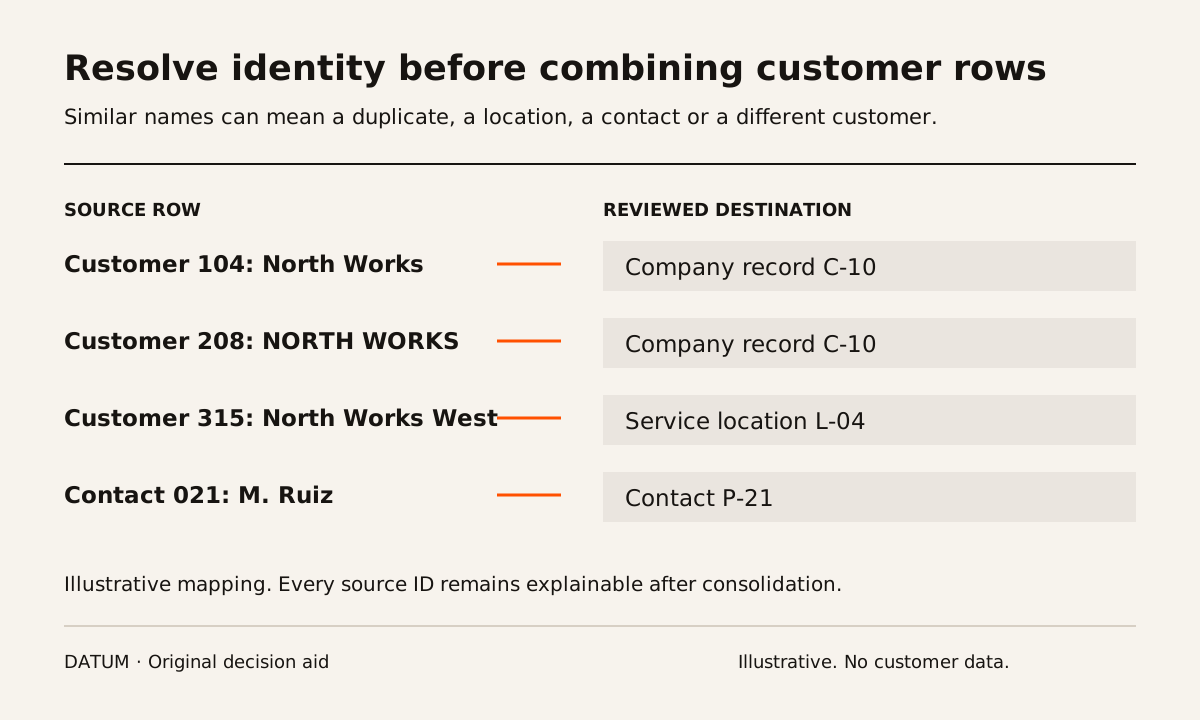
Resolve customer identity before importing records into Odoo. Similar names are a reason to investigate, not sufficient evidence to merge. Keep a mapping from every source identifier to its intended destination so orders, contacts and billing history do not lose their relationships during cleanup.
Odoo's import documentation explains the role of External IDs in updating existing records and linking related data. It also warns that imports are permanent. That makes a reviewed identity map and a test import more useful than repeatedly loading a file until the customer list looks tidy. Odoo 19 export and import data.
Separate the organization, the location and the person
Start by identifying what each source row represents. A company, a branch, a delivery location and a person may share words in their names without being interchangeable records. Conversely, spelling differences may describe the same organization.
Imagine a fictional customer list with “North Works,” “North Works West” and “M. Ruiz.” The first is a company, the second is its service location and the third is a site contact. A name-similarity routine could group them, but it cannot decide the relationship the operating team needs.
Ask the people who use the records where work is performed, who receives invoices and who may approve changes. Do not infer that a shared email address proves common billing responsibility. Record the answer with its source and reviewer.
Use a candidate-review sheet
Normalize formatting in a working copy to help comparison: whitespace, capitalization and ordinary punctuation. Preserve the source value as evidence. Normalization should make a possible match easier to inspect, not overwrite the distinction you are trying to understand.
| Review field | What to record |
|---|---|
| Source identifiers | Every original record ID in the candidate group |
| Candidate relationship | Same organization, related location, contact, separate entity or unresolved |
| Evidence | Approved account reference, current business record or owner confirmation |
| Conflicting details | Different billing names, locations, terms or history |
| Destination decision | Keep separate, link, consolidate or hold |
| Destination identifier | Stable identifier for the intended imported record |
| Reviewer | Person responsible for the identity decision |
Use sensitive identifiers only within approved access and storage boundaries. The worksheet does not require copying private identity documents into a general project file.
Decide what happens to conflicting fields
Even when two rows represent the same customer, their fields may disagree. One has the current address, another the purchasing contact, and both have transactions. “Keep the newest row” may discard useful information if the latest change was only a spelling correction.
Define selection rules by field. Ask the account owner to confirm the current billing contact and the location owner to confirm the service address. Keep unresolved commercial details for an authorized decision. Do not let the cleanup script choose payment terms merely because one cell is nonblank.
Maintain a decision log for exceptions. It should explain the choice well enough that the import team can repeat it without consulting the original reviewer for every row.
Prove the relationships after a small import
Select a sample containing an ordinary customer, a consolidated duplicate, a company with multiple locations and an unresolved candidate excluded from the load. Import into a rehearsal environment using the planned identifiers and relationships.
Read back the customer, its contact and a representative related document. Check that the document points to the intended organization and location. Then rerun a permitted update to the same source identifier and confirm that the intended record changes without creating another customer. This is an acceptance test to demonstrate, not an assurance about an untested mapping.
The migration rehearsal guide provides control totals and a way to record rejected rows. Count both source records and destination records, but explain the difference. Three source rows becoming one destination may be correct only if all three appear in the approved mapping.
Keep unresolved customers out of automatic consolidation
A held candidate should have a reason, owner and next evidence request. That preserves progress on clear records without turning uncertainty into a false merge. Make sure the release plan accounts for transactions tied to the held record; excluding the customer may also exclude required open work.
Use the ERP implementation work-packet method to assign those dependencies. The acceptance result is not simply fewer customer rows. It is a customer set whose identities, relationships and imported references can be explained, with the ambiguous cases still visible to someone who can decide them.