
Find the next blocked result when an ERP project stalls
Diagnose one blocked ERP workflow using scope, data, decisions and team capacity. Run a bounded recovery test before rewriting the rest of the plan.
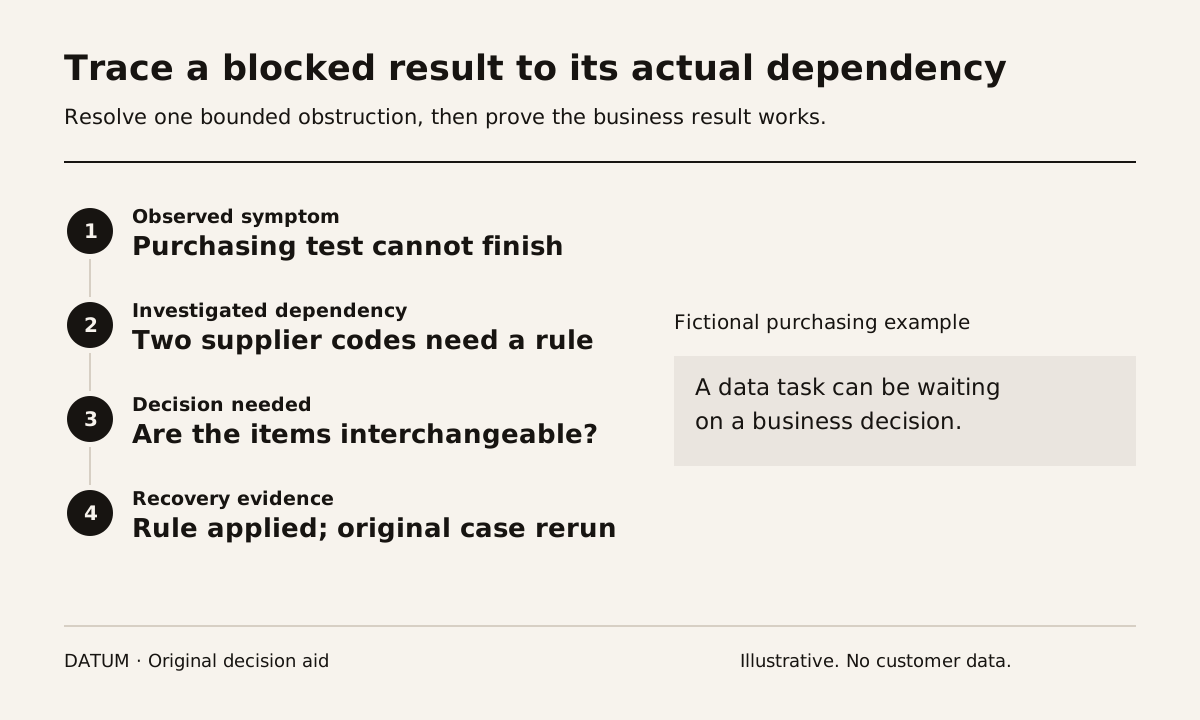
When an ERP project stalls, identify the next business result that cannot be completed and the specific condition blocking it. A late milestone is a symptom. The useful diagnosis names the missing decision, record, rule or person, then tests whether resolving it allows work to move.
This is a recovery method, not a claim about how often ERP projects fail or the leading cause across an industry. Use your own project evidence. Start with one blocked workflow instead of asking everyone to explain the whole project at once.
Replace “nearly finished” with an inspectable result
Choose a result such as “the buyer can prepare a purchase order from an approved request using the correct supplier and product.” Try to complete it in the current test environment. Record where the attempt stops and what happened immediately before it.
Then classify the obstruction using the following diagnostic. The categories are prompts for investigation; one obstruction can involve more than one.
| Suspected blocker | Evidence to request | Smallest useful next action |
|---|---|---|
| Scope is unsettled | Conflicting descriptions of the expected result | Name the baseline and obtain a decision on the difference |
| Data is unfit or unavailable | A specific missing, duplicate or ambiguous record | Have the data owner resolve a sample and test the rule |
| A business decision is open | The question, options and authorized decision owner | Resolve the question with its consequence visible |
| Team capacity is absent | Required participant and unavailable work slot | Assign real review time or change the plan |
| Configuration or integration is defective | Reproducible input, expected outcome and observed outcome | Correct the defect and rerun the affected case |
Do not turn the table into a blame label. “Finance is blocking us” is weaker than “the project has no approved rule for this billing exception, and the named reviewer has not been given time to decide it.” The latter statement can change the plan.
Follow one dependency backward
Consider a fictional distributor whose purchasing test keeps being postponed. The team says product migration is unfinished. Inspection finds two supplier codes for the same item. The data owner cannot merge them because the buyers disagree about whether they represent interchangeable products.
The immediate task is data preparation, but the unresolved issue is a purchasing decision. Repeating the import will not decide whether the products may be substituted. Ask the authorized owner to resolve a small set of examples, record the rule and apply it to the remaining affected records.
If the project uses Odoo imports, keep stable External IDs and use a rehearsal database. Odoo warns that imports are permanent and documents how External IDs distinguish updates from new records. That makes repeated trial imports into production a poor substitute for resolving the source data. Odoo 19 export and import data.
The data migration rehearsal gives this work control totals and an exception log. The implementation timeline guide helps show which later activities depend on the corrected result.
Distinguish a defect from a changed expectation
A failed test needs an expected outcome. Compare that outcome with the agreed scope and acceptance evidence. If the team had already agreed that only approved requests become orders, creating an order from an unapproved request may be a defect. If a new request adds a second approval path that was never defined, the team needs a scope decision.
Do not resolve the ambiguity by declaring every issue included or every issue extra. Record the baseline, requested difference, business consequence and decision owner. Use the statement-of-work guide to make the delivery boundary inspectable.
Separating these cases protects the recovery plan. A configuration correction and a new process design may require different people, evidence and testing, even when both appear on the same issue list.
Run a recovery slice before rewriting every date
Choose one blocked result with a bounded path to resolution. Write the missing input, its owner, the decision required, the delivery task and the acceptance test. Secure actual time from the people who must decide and review. “Available as needed” is not a scheduled commitment.
After the change, rerun the original case and the exception most likely to be affected. Keep the observed result. If the blocker remains, revise the diagnosis rather than marking the activity complete because someone held a meeting or edited a setting.
Only then update the dependent plan. The recovery record should say what now works, what is still blocked and which dates or assumptions changed. A narrower scope may be appropriate if it produces a complete, usable workflow with explicit boundaries. It is not appropriate if it hides an unresolved step that users will immediately encounter.
The first sign of recovery is an accepted business result that was previously blocked. Use that evidence to decide whether the same method can address the remaining work, whether capacity must change or whether the project needs a larger reset.