
Aspire vs LMN: test a landscape job after the plan changes
Compare Aspire and LMN with recurring maintenance, an enhancement and a weather change. Trace crew work, actual costs and billing in the proposed setup.
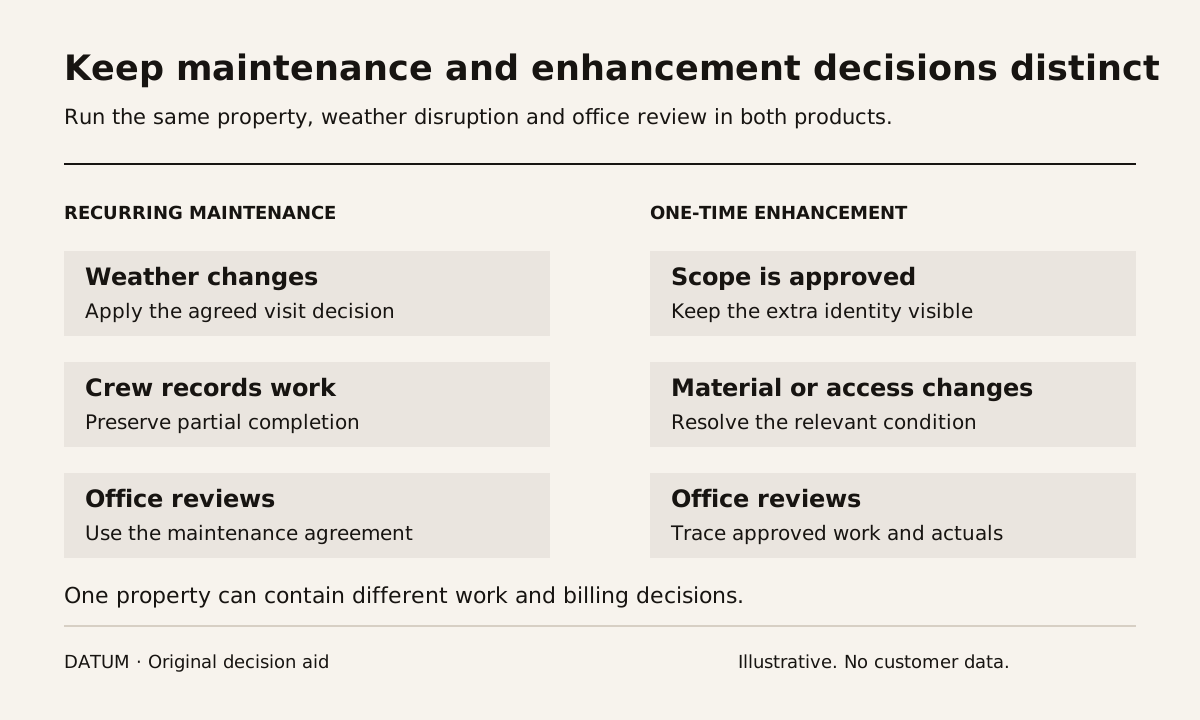
Compare Aspire and LMN using a landscape job that changes after it is scheduled. Include the estimate, crew instructions, recorded work, weather disruption and billing decision. A recurring maintenance visit and a separate enhancement can share a property while requiring different scope and commercial treatment.
Aspire presents landscape capabilities including scheduling, job costing, estimating, CRM, invoicing and reporting. LMN's current official product page, now under Granum, presents budget-based estimating, scheduling, job and time tracking, invoicing and job costing. These are categories to investigate in the proposed packages, not proof that every function is included or configured for your operation. Aspire landscape software and LMN by Granum.
Use a property with two kinds of work
Create a fictional property with recurring maintenance and an approved one-time planting enhancement. Give both demonstrators the same scope, property information, crew roles and billing assumptions. Keep any customer data out unless its use is authorized.
The recurring visit should have defined work and completion evidence. The enhancement should have its own accepted scope and planned material. Make the relationship visible without allowing a note on one job to silently change the other.
Use the one-job tracing method to identify the actual office handoffs you want the test to reproduce. Ask the estimator, scheduler, crew lead and billing person what each needs from the previous step.
Disturb the schedule deliberately
Introduce rain before the planned maintenance visit. Ask each proposed setup to show the team's chosen response: reschedule, skip under an approved policy, perform only permitted work or hold for a decision. The software should represent the business's decision rather than make up the commercial consequence of a missed visit.
Then keep the enhancement on a different decision path. It may need material, site access or a separate crew. Test whether changing the maintenance visit creates an unintended change to the enhancement.
| Scenario | What to inspect | Who should explain the result |
|---|---|---|
| Maintenance rescheduled | Current visit date and crew instruction | Scheduler |
| Visit partly completed | Work done, work remaining and reason | Crew lead |
| Enhancement material changes | Accepted substitution and quantity | Authorized scope owner |
| Crew records time | Time associated with the intended job | Crew lead and office reviewer |
| Billing is prepared | Agreement, completion evidence and prior billing | Billing reviewer |
| A correction arrives late | Updated evidence and next required action | Person responsible for the affected record |
These are proposed tests for the intended configuration. They are not assertions that either product automatically handles every case in a particular way.
Compare estimate and actual on the same basis
Ask the estimator to explain the planned labor, material and equipment assumptions for the enhancement. After the test crew records actual work, have the office trace those entries to the same job and categories.
Do not compare a budget covering the whole property with actuals covering one visit and call the difference a margin problem. Confirm the period, scope and included cost categories before interpreting the result. If the team wants financial conclusions, have the responsible finance person approve the calculation and its inputs.
A useful comparison records missing data and unassigned time as unresolved. It does not treat them as zero merely because the report can still produce a total.
Test the field record on the intended device
Have the crew lead open the work on the phone or tablet intended for daily use. Check the current instruction, required evidence and correction process. Demonstrate the connectivity conditions that matter to the crew rather than assuming a general mobile claim covers the task.
The real-device acceptance method offers a reusable test structure. Its Odoo-specific product details should not be attributed to Aspire or LMN. For this comparison, record each vendor's actual proposed app, package and observed behavior.
Ask an office reviewer to read back the saved completion without a verbal explanation. That step exposes whether the record is useful to someone who was not on site.
Include the work needed to adopt the result
For each requirement, distinguish demonstrated behavior, configuration still needed, an additional product or integration, and a retained manual step. Include property data preparation, recurring-job setup, estimate structures, accounting connections and training in the responsibility map.
Use the ERP ownership-cost worksheet as a neutral way to separate supplier cash costs from internal preparation time. It is a planning method, not a claim that the two vendors use the same pricing structure.
The selection record should name which package handled the property, disrupted visit and enhancement with the least unresolved work for your team. Avoid choosing by an assumed company-size cutoff or an unverified ranking. Keep the saved scenarios and limits so the people who will operate the system can assess the decision.