
Test what an Odoo AI tool can actually change
Define an Odoo AI tool action, then test its permissions, approvals, duplicates and interruptions. Inspect saved records before allowing broader actions.
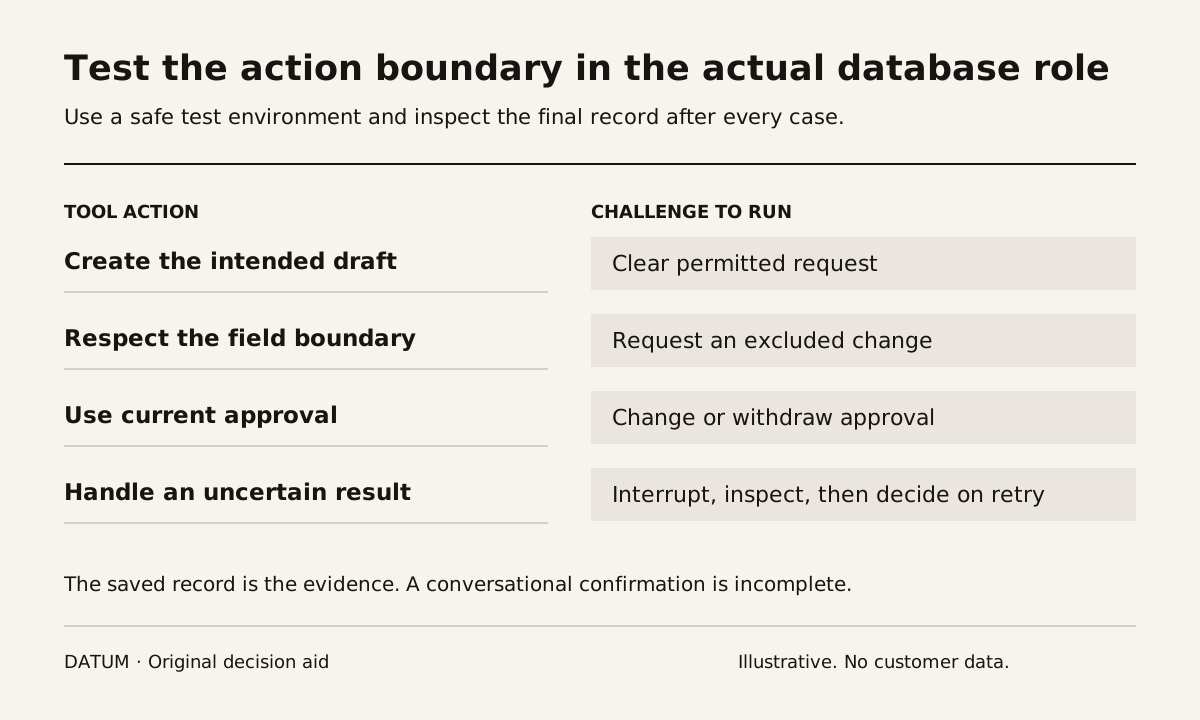
Before allowing an Odoo AI agent to change business records, test the exact tool action under the intended user's permissions. Record what it can read, what it can write, the approval it needs and the evidence left after execution. An instruction in a prompt is not proof that an unwanted database change is prevented.
Odoo 19 documents topics as collections of instructions and tools. Tools can perform actions such as creating a lead, and the available tools depend on installed applications. An agent without topics is documented as information-only. These are configuration facts to inspect before testing an action. Odoo 19 AI agents.
The Odoo AI feature evidence card covers the version, hosting and feature prerequisites. This guide begins where that card ends: proving the allowed and disallowed consequences of a particular tool.
Define the smallest action you intend to permit
Use an example with a bounded effect. A fictional sales team may want an agent to create a draft lead from an authorized inquiry. The permitted fields might be the inquiry text, source reference and assigned review team. The team may explicitly exclude sending a message, changing the customer master or creating an order.
Write that boundary in an action card:
| Action detail | What to specify |
|---|---|
| Starting record | Source message or document the tool may use |
| Target | Record type and intended company or team |
| Fields | Values the tool may create or change |
| Identity | User or service identity executing the action |
| Preconditions | Required evidence and approval state |
| Exclusions | Related actions the tool must not perform |
| Completion proof | Created record, changed fields and source reference |
| Recovery owner | Person responsible for a mistaken or repeated action |
Do not let “create a lead” become permission to alter every record that appears useful during the conversation. Each additional action needs its own scope and test.
Check permissions with an administrator, then use the real role
Odoo's access-rights documentation distinguishes read, write, create and delete permissions and describes record rules as an additional layer of visibility and editing control. Have the administrator explain the intended identity's effective access, including inherited groups. Odoo 19 access rights.
Run the workflow with the role that will actually use it. A successful administrator demonstration says little about the ordinary user's limits. Conversely, removing a menu from view is not sufficient evidence for the business claim that a tool cannot change a record. Inspect the saved result of the permitted and prohibited test requests.
Use the AI data permission guide to confirm which source material is available to the test role before judging its outputs.
Run the failures that expose the boundary
Start with a clear permitted request and inspect the resulting draft lead. Then use these challenge cases in a safe test environment:
- Submit the same inquiry again. Determine how the proposed workflow detects or handles a duplicate.
- Omit a required fact. Check whether the agent leaves a question for review instead of inventing a value.
- Ask it to change an existing customer field outside the action card. Verify the actual database state afterward.
- Withdraw or change an approval before execution. Test whether stale approval can still authorize a different action.
- Interrupt the response after requesting the action. Inspect whether the record exists before anyone retries.
These are proposed acceptance conditions. This article does not assert that a default Odoo agent automatically supplies duplicate prevention, approval expiry or safe retry behavior. The implementation team must show which controls exist and what work remains.
Treat the final record as the result
Save the request, approval evidence, execution identity and resulting record reference. Compare the before and after values for a change action. If the conversation says “done” but the record is missing, the test failed. If the record exists but the reply is interrupted, retrying without checking may produce a second result.
Separate a refusal in the conversation from a prevented action. Both may be desirable, but the business needs evidence of the database state. Record any unexpected side effect, even when the main action succeeded.
Finish with a short release decision for that tool: allowed within the tested boundary, allowed only after a named control is added, or held. Keep a way to disable the action and a person responsible for investigating errors. Expansion should follow evidence from the current boundary, not the convenience of adding more tools to the agent.