
Map one process before writing ERP requirements
Trace actors, records, decisions and exceptions before writing ERP requirements. Convert a missing handoff into an acceptance statement the team can test.
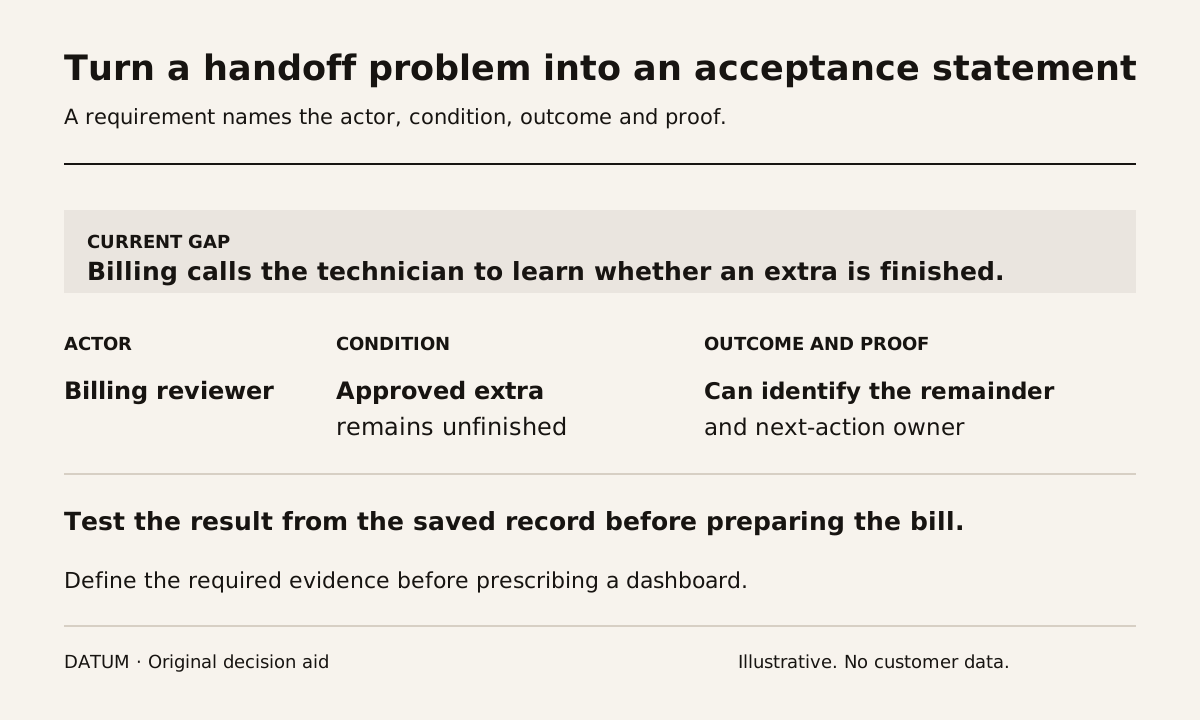
Map one complete business process before writing ERP requirements. Follow a real item of work from its starting event to the point where the next person has an accepted result. Record the handoffs, decisions, source records and important exceptions. Then turn the observed gaps into requirements with testable outcomes.
Begin with evidence rather than a workshop list of desired features. A request for “better visibility” becomes useful when the team can name the missing fact, the person who needs it and the decision it supports.
The one-job tracing guide helps collect that evidence. This exercise uses the trace to define the future requirement rather than assuming every current step should be reproduced.
Choose a boundary a person can finish
Use a process such as approved service request to assigned visit, accepted order to released production, or completed delivery to prepared billing. Name the event that starts it and the evidence that establishes the end.
Avoid a boundary like “sales” or “inventory.” Those labels contain many different decisions. A bounded process lets the team test whether a proposed change actually improved a handoff.
Choose one normal case and one meaningful exception. If every example is clean, the map may omit the decision that consumes the most office effort. If every example is unusual, the team may overbuild the ordinary path.
Write the handoff map
| Step | Person acting | Record used | Decision or action | Evidence passed onward |
|---|---|---|---|---|
| Request accepted | Named commercial role | Approved scope | Confirm what is authorized | Accepted requirement and revision |
| Work prepared | Operations role | Requirement and capacity information | Decide what can be assigned | Ready work or a visible unresolved condition |
| Work performed | Operator or technician | Current instruction | Record actual result | Completion evidence and exceptions |
| Result reviewed | Receiving office role | Saved outcome and agreement | Accept, query or prepare next record | Traceable next action |
This is a generic starting shape, not a required sequence for every business. Replace the labels with your actual roles and records. Some processes need a technical release, a material check or a separate approval; others do not.
Keep waiting visible. If a task stops because a supervisor must interpret a note, record the missing decision and its owner. Do not conceal the delay by drawing an uninterrupted arrow between two boxes.
Distinguish a record state from a business decision
Software statuses have specific meanings. For example, Odoo 19 Sales documents a confirmed quotation becoming a sales order. Your business still needs to define what that confirmation authorizes downstream and whether another release decision is required. Odoo 19 quotations.
In a fictional installation process, sales acceptance may authorize scheduling while a site-access question still prevents the crew from starting. If the map uses one “approved” label for both conditions, the requirement will remain ambiguous.
Name the facts separately: commercially accepted, site access confirmed, material ready and work released. Use only the distinctions the process needs, and assign an owner to each decision.
Convert one gap into an acceptance statement
Suppose the office repeatedly calls technicians to determine whether an extra was completed. “Add a completion dashboard” prescribes a solution before the evidence requirement is clear.
A better statement is: “Given a job with an approved extra that remains unfinished, the billing reviewer can identify the unfinished scope and its next-action owner from the saved record before preparing the bill.” The implementer can then propose the simplest configuration that demonstrates that result.
Use the implementation work-packet guide to give the requirement an owner, required inputs and acceptance evidence. Keep the original example so the test remains reproducible.
Remove work only after understanding its purpose
A duplicate spreadsheet may exist because the main system lacks a required view. It may also preserve an approval or calculation that nobody has documented. Ask what decision each repeated entry supports before eliminating it.
Mark each current step as retained, changed, removed or unresolved, with a reason. Test the future path using the same normal and exception cases. If a removed step supplied necessary evidence, put that evidence somewhere explicit in the new design.
The resulting requirement set should be shorter than the conversation that produced it. Each requirement should name an actor, a condition, an outcome and proof. That gives the ERP team something concrete to build and gives the business a way to reject an attractive screen that leaves the original handoff problem unsolved.