
CRM or ERP? Follow the record your next team needs
Decide whether your business needs CRM changes, ERP work or a better handoff. Use a record-by-record worksheet before comparing software demos.
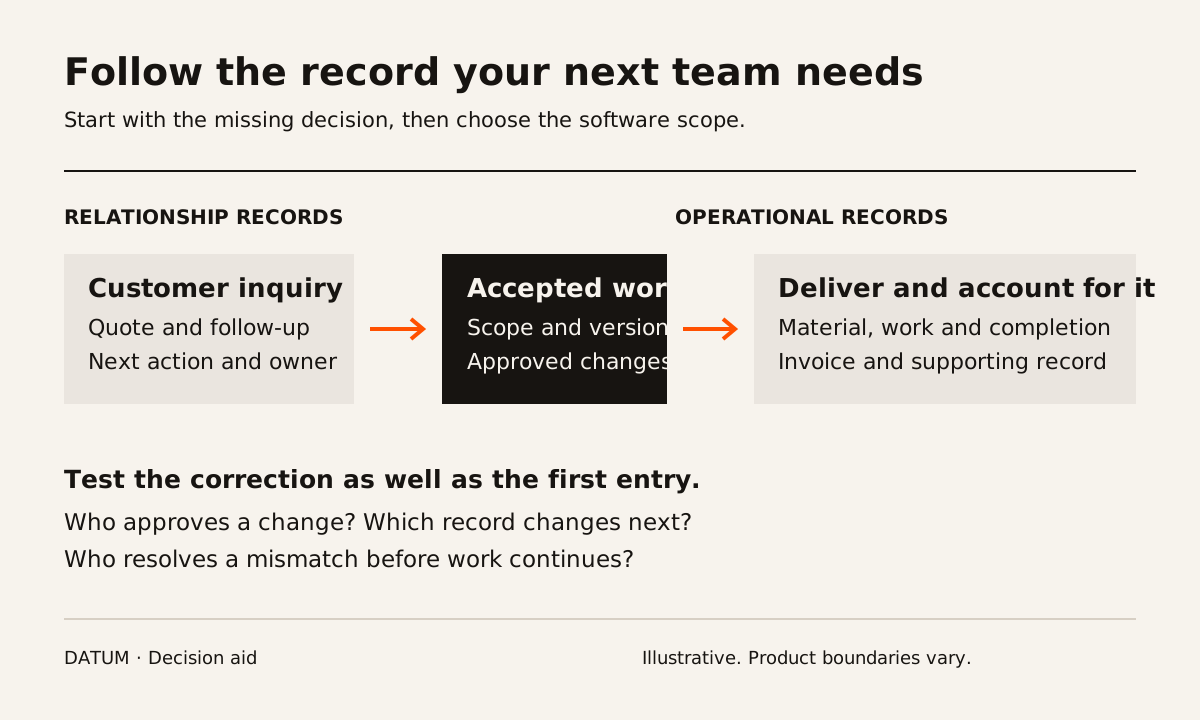
Choose a CRM when the main problem is managing customer relationships and sales follow-up. Evaluate an ERP when completing and accounting for the work requires several teams to share reliable records. If both problems exist, define the handoff between them before choosing whether to use one suite or separate systems.
That distinction describes the center of each category, not a fixed boundary around every product. Salesforce describes CRM around managing interactions with customers and prospects. Oracle describes ERP around connected business processes such as accounting, procurement and supply chain operations. Product suites can cover both. Salesforce's CRM definition, Oracle's ERP definition.
The useful buying question is more specific: which decision cannot be made because the next person lacks a dependable record?
Find the point where the record stops helping
Take one completed job or order. Put the inquiry, quote, accepted scope, work record and invoice beside each other. Ask the people who handled them to identify the record they trusted at each step.
Suppose a fictional HVAC business knows which quotes need follow-up, but its office cannot tell whether a technician's extra material was approved. The sales pipeline is functioning. Another follow-up dashboard would not resolve the approval gap. The next investigation belongs between field work and billing.
Now change the example. Technicians record work consistently and billing has what it needs, but prospective customers receive quotes with no assigned next action. That points toward the sales process and its CRM, even if the company also has an aging accounting system.
These examples are diagnostics, not proof that either company needs new software. An unclear owner or missing approval rule can survive a replacement.
Use this worksheet before watching a demo
Complete one row for each recurring problem. Replace the sample records with your own.
| Decision that is difficult today | Record needed | Person who must act | First area to investigate |
|---|---|---|---|
| Which quote needs a follow-up today? | Opportunity, last contact and next action | Sales owner | CRM process and adoption |
| Can we promise this delivery date? | Accepted demand, available material and capacity | Operations planner | Planning records and their connections |
| What should this customer be billed? | Accepted scope, changes and completed work | Billing owner | Work-to-invoice handoff |
| Should we reorder this component? | Stock, open demand and incoming supply | Purchasing owner | Inventory and purchasing records |
| Which customer record is correct? | Shared identifier and agreed ownership | System owner | Data rules across the systems |
The last row matters. Two applications may both contain customers. Decide which one creates the identifier, who can change the billing details and how the change reaches the other application. A common name alone is not a dependable matching rule.
Do not total these rows into a software score. One critical failure can matter more than several inconveniences. Record the consequence beside each problem: delayed billing, an unreliable promise, duplicated work or a missed conversation. Use actual observations; avoid assigning a dollar value you cannot substantiate.
Test the handoff, including the correction
Give each vendor the same fictional or properly anonymized scenario. Ask them to show the sequence in the proposed edition and deployment, with the permissions that each employee would actually have.
- Create a customer inquiry and assign its next action.
- Prepare a quote, record acceptance and identify the approved version.
- Hand the accepted work to the person who schedules or produces it.
- Change one detail after acceptance, such as a quantity or service address.
- Show who approves that change and which downstream record receives it.
- Prepare billing and trace one line back to the work that supports it.
The fourth step often makes a demo more informative. A smooth first entry tells you little about corrections. Look for who resolves a mismatch, what remains in history and whether someone must enter the same change again elsewhere.
Treat this as an acceptance test you are proposing, not as a list of features every CRM or ERP necessarily provides. Ask the vendor to distinguish standard configuration, a paid add-on, an integration and custom development. If a step is only a slide, record it as unproven.
A larger suite also creates a larger responsibility
A shared suite can be worth evaluating when purchasing, inventory, work and billing need the same records. It also makes the scope of the change important: which teams must learn new tasks, which records must move and who decides whether the result is correct?
Separate systems may remain appropriate when an existing specialist tool handles an essential workflow well. In that case, evaluate the boundary. Which fields cross it? In which direction? What happens when a transfer fails or arrives twice? Who checks unresolved items before work continues?
Avoid assuming that an integration means every feature is available on every subscription. For example, Odoo's published plan comparison distinguishes access to external APIs and hosting options. Check the current commercial and technical requirements for the exact connection being proposed. Odoo's plan comparison.
Choose the smallest scope that resolves the observed failure without moving it to the next team. Before asking for quotes, complete the worksheet for one recent job and write a single acceptance sentence: “The billing owner can trace an approved change from the work record into the invoice without asking the technician to reconstruct it.” Your sentence may be different. It should be specific enough that a demonstration can pass or fail.
Use the handoff worksheet to collect the records and owners for that conversation.